
Selecting a foundational web hosting environment is one of the most critical structural decisions for any digital platform. The infrastructure upon which a website is deployed directly influences page execution speeds, database reliability, search engine visibility, and operational cost scales over multi-year lifecycles. When evaluating Bluehost for WordPress as a prospective hosting framework, technical administrators and business decision-makers must look past marketing generalities to understand the core mechanical capabilities and limitations of the platform.
This analysis provides an exhaustive, structurally neutral investigation into the architectural composition, financial commitments, configuration workflows, and performance profiles of the platform. By examining documented server behaviors, resource allocation protocols, and real-world database handling, this guide serves as an authoritative reference for choosing and managing your hosting environment. We maintain a strict focus on objective data, structural analysis, and empirical infrastructure patterns, ensuring you can make a highly informed, low-regret decision.
Technical Architecture and System Infrastructure
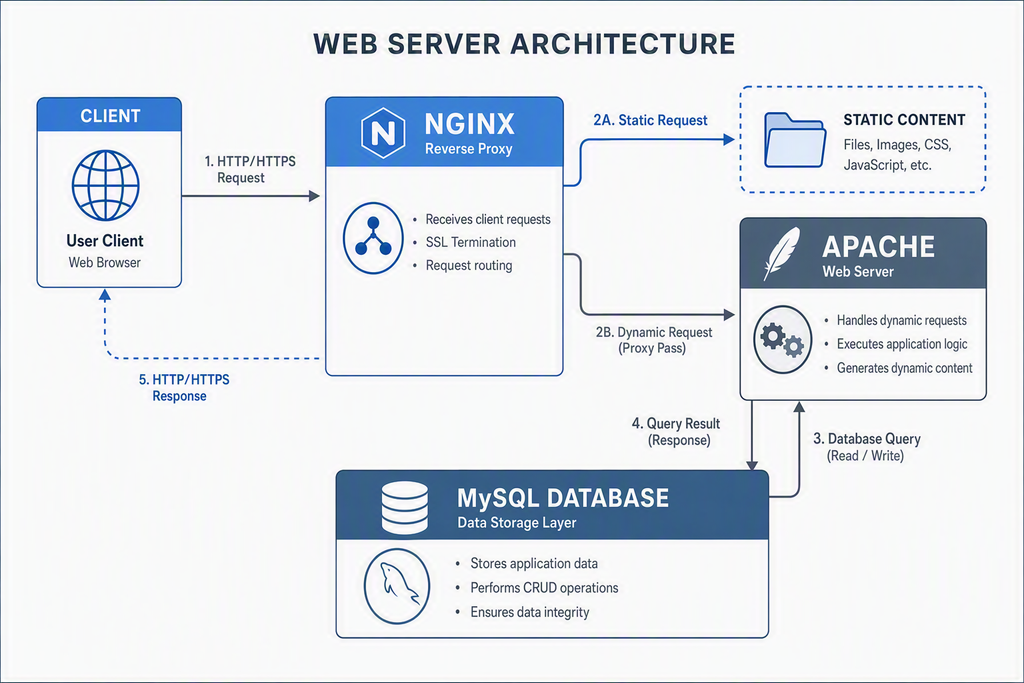
To understand the performance patterns of Bluehost for WordPress setups, we must first examine the underlying physical and virtual server architecture. The platform predominantly relies on a highly customized Linux-based environment running Apache web servers, integrated with custom caching layers and Nginx reverse proxies. In shared environments, hardware resources are distributed across multiple virtual accounts on single bare-metal servers, utilizing kernel-level isolation to partition filesystems and database access.
For standard entry and mid-tier plans, storage is provisioned on Solid State Drives (SSDs) and Non-Volatile Memory Express (NVMe) storage pools. NVMe storage provides substantially faster input/output operations per second (IOPS) compared to older SATA-based solid-state drives, resulting in faster database query execution and quicker static asset loading. However, the performance efficiency of this storage depends heavily on concurrent server load and the density of neighboring accounts on the same physical hardware node.
The network topology relies on major Tier-1 bandwidth providers, routing traffic through key regional data centers. The primary data center facility is located in Provo, Utah, which serves as the central hub for global traffic routing. Without an active Content Delivery Network (CDN) layer, response latencies naturally increase as the physical distance between the accessing client and the Utah data center expands. This geographic dependency makes edge-caching configurations highly critical for sites serving international audiences.
Quick Summary
- The infrastructure is built on a Linux-Apache-MySQL-PHP (LAMP) stack with Nginx acting as a reverse proxy to accelerate static content delivery.
- The primary server hub is physically located in North America, making external CDN integration highly recommended for global site visitors.
- NVMe storage pools are utilized to enhance database access speeds, though shared environment resource limits still apply to CPU and memory usage.
Analyzing the Architecture of Bluehost for WordPress
Within the modern hosting framework, the configuration parameters of the PHP execution engine play a vital role in site stability. By default, Bluehost for WordPress environments are pre-configured with specific PHP memory limits and execution thresholds designed to protect the shared server from runaway scripts. Standard allocations typically include a memory_limit of 256MB or 512MB, which is sufficient for average core execution but may require manual modification for highly complex, plugin-heavy sites.
Looking for Blazing-Fast NVMe Cloud Hosting?
ChemiCloud delivers LiteSpeed-powered 100% NVMe storage, free 24/7 migration, a free domain, and an industry-leading 45-day money-back guarantee.
Get Up to 70% Off ChemiCloud Plans Today →Database interactions are managed via MySQL or MariaDB engines. In a shared database environment, the system imposes limits on the maximum number of concurrent database connections to prevent individual sites from monopolizing system memory. If a site experiences a sudden surge in simultaneous visitors, and the database connection pool is exhausted, the server will return database connection errors. This architecture underscores the necessity of implementing aggressive object caching and transient database queries at the application level.
Furthermore, the server software stack utilizes HTTP/2 and, in updated clusters, HTTP/3 protocols to multiplex data transmission over a single TCP connection. This reduces the overhead associated with loading numerous small files, such as theme assets, plugin stylesheets, and image thumbnails. By optimizing the handshake process and headers, the server minimizes the total round-trip time required to assemble a web page in the user browser, aligning with modern World Wide Web Consortium standards for optimal web delivery.
Financial Blueprint: Tiered Plans and Bluehost for WordPress Costs
A comprehensive assessment of any hosting platform requires a thorough breakdown of its financial structures. The pricing model utilizes a multi-tiered promotional structure where initial sign-up terms are heavily discounted, while subsequent renewal cycles revert to standard retail pricing. Understanding this pricing transition is essential for calculating the true total cost of ownership (TCO) over a three-to-five-year operational horizon.
The shared hosting portfolio is divided into several specific tiers: Basic, Choice Plus, Online Store, and Pro. The Basic tier is engineered for single-site operators requiring minimal storage and resource allocations, making it highly suitable for personal portfolios or static informational sites. The Choice Plus tier introduces automated backup integrations, domain privacy, and expanded NVMe storage limits, positioning it as the primary entry point for growing content sites.
For transactional platforms, the Online Store tier bundles specialized e-commerce plugins, payment gateway setup assistants, and security enhancements designed to streamline digital retail configurations. The Pro tier represents the peak of the shared infrastructure, offering higher CPU resource allocations, a dedicated IP address, and advanced backup retention schedules. This tier is designed to bridge the gap between standard shared resources and dedicated virtual private servers.
Key Takeaways
- Initial promotional rates represent a significant discount but are tied to multi-year commitments (typically 12 or 36 months) paid in advance.
- Renewal rates increase substantially, requiring careful long-term budgeting to avoid sudden operational cost increases.
- Add-on services, such as premium backup solutions, dedicated IP addresses, and advanced security scanning, must be factored into the overall TCO.
| Hosting Tier | Introductory Monthly Rate (12-Mo) | Standard Renewal Monthly Rate | Primary Structural Limit |
|---|---|---|---|
| Basic | $2.95 | $10.99 | Single website, 10GB NVMe storage limit |
| Choice Plus | $5.45 | $19.99 | Multiple websites, 40GB NVMe storage, temporary backups |
| Online Store | $9.95 | $24.99 | Multiple websites, 40GB NVMe storage, e-commerce bundle |
| Pro | $13.95 | $28.99 | Multiple websites, 100GB NVMe storage, optimized CPU allocation |
When analyzing these financial dynamics, administrators must evaluate the renewal terms. A common mistake is selecting a short initial term (such as 12 months) only to face the higher standard renewal rate much sooner than anticipated. Opting for a 36-month initial commitment locks in the lower introductory pricing for a longer period, resulting in significant upfront savings. However, this strategy requires a larger initial capital outlay and commits the project to the platform for a longer duration.
Performance Benchmarks and Global Delivery Networks
System performance is a critical factor in search engine optimization and user retention. To evaluate the performance of Bluehost for WordPress setups, we must analyze metrics such as Time to First Byte (TTFB), core web vitals, and server response consistency under varying concurrent user loads. Observed patterns suggest that while raw server response times are competitive in regional markets, international performance heavily relies on caching layers.
The integration of the Cloudflare CDN plays a crucial role in mitigating geographic latency. When enabled, static assets—including images, JavaScript libraries, and CSS files—are cached across hundreds of global edge servers. When a user requests a page, these assets are delivered from the nearest physical edge node rather than routing the request back to the central server in Utah. This network structure aligns with the Internet Engineering Task Force network protocols for reduced traffic overhead.
Another architectural element to monitor is the Resource Protection system. In shared hosting environments, this system monitors usage metrics such as CPU cycles, memory allocation, and database queries. If an account experiences an unusual spike in resource consumption—often caused by unoptimized plugins, database-heavy search queries, or malicious scraping bots—the protection system will temporarily throttle the account. This prevents the site from impacting other users on the same physical node but can result in temporary 503 Service Unavailable errors for your visitors.
Step-by-Step Walkthrough: Deploying Bluehost for WordPress
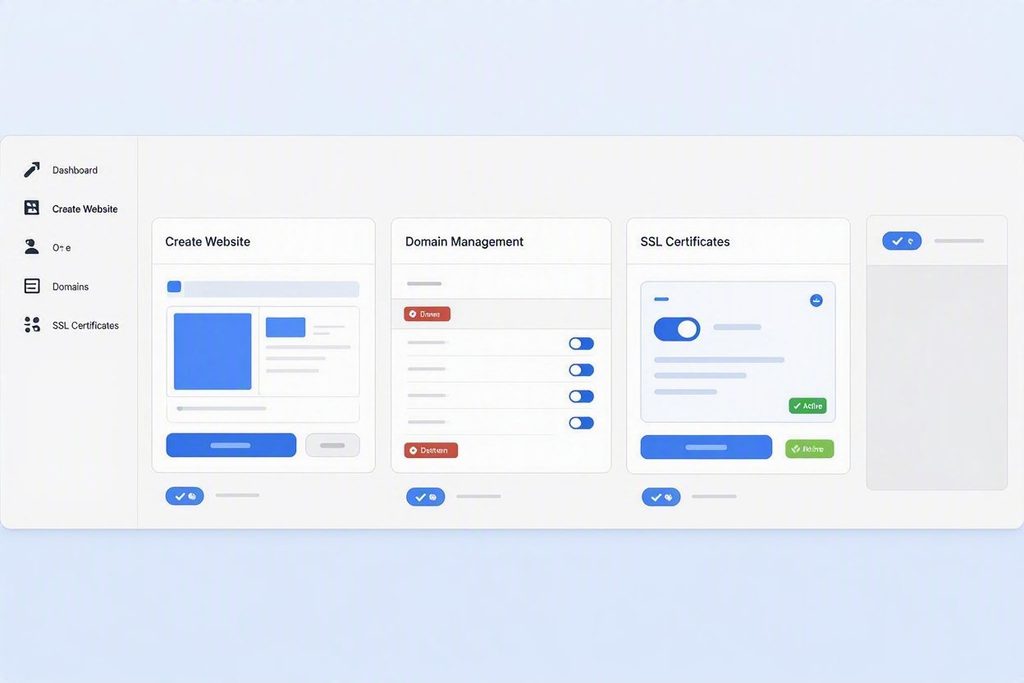
Deploying a site within the Bluehost for WordPress environment follows a structured setup process. This step-by-step walkthrough details the precise navigation paths and configuration steps required to launch a clean, optimized installation from the primary administration dashboard.
First, access the centralized customer portal by navigating to the login page and entering your credentials. Once the main dashboard loads, locate the primary navigation menu on the left sidebar. Click on the My Sites menu option, then locate and click the Create Site button positioned in the top right quadrant of the screen. This action initiates the automated WordPress provisioning wizard.
The setup wizard will prompt you for essential site details. Input your site name and primary tagline in the designated text fields. Below these fields, toggle the advanced settings to customize your administrator email address, username, and secure password. Avoid using generic administrator usernames to enhance system security from the initial deployment.
Next, the system displays the Domain Selection interface. Use the dropdown menu to select your registered primary domain name. Below the domain selection, a list of recommended pre-installed plugins and add-ons will appear. To maintain a clean database and prevent unnecessary resource load, uncheck all optional plugins, including recommended marketing tools and third-party security bundles. Click the Next button to begin the core file installation.
Once the system finishes copying the core files, navigate back to the My Sites dashboard. Select your newly created site and click on the Manage Site button. Within this management sub-menu, navigate to the Security tab. Locate the SSL Certificate toggle switch and ensure that the free Let’s Encrypt SSL certificate is active. If the status displays as pending, allow up to twenty-four hours for global DNS propagation and verification before manually triggering a renewal check.
Common Failure Points & Operational Troubleshooting
Even with automated deployment wizards, administrators occasionally encounter technical issues during setup or routine maintenance. Understanding these common failure points, their root causes, and technical resolutions is essential for maintaining site uptime and operational continuity.
One common issue is the database connection error, which typically occurs when the application cannot communicate with the underlying MySQL database server. This is often caused by incorrect credentials in the main configuration file or corrupted database tables. Similarly, SSL handshake errors can occur if the domain name is not properly pointed to the host nameservers before the secure certificate is provisioned.
Another common issue is encountering a file system limit error, often related to the account inode count. Inodes represent the total number of files and directories stored within your hosting account, including emails, cached assets, and system files. Exceeding your plan inode limit can prevent the database from writing temporary files, leading to unexplained site crashes and file upload failures.
⚠️ Common Issue: Database Connection Failures
Symptom: The website displays an Error Establishing a Database Connection screen instead of the homepage.
Likely cause: The wp-config.php file contains mismatched database names, usernames, or incorrect local host ports after server migrations or credential updates.
Resolution: Access the cPanel File Manager, open the wp-config.php file, verify that the DB_USER and DB_PASSWORD constants match the active database user in MySQL Databases, and ensure DB_HOST is set to localhost.
In Short
- Keep your account inode count low by regularly purging temporary cache folders, old site backups, and unused image files from the server.
- Verify database credentials within the wp-config.php file immediately following any server migrations or administrative password changes.
- Ensure your domain nameservers are fully updated to point to the host servers before attempting to activate secure SSL certificates.
Security Architecture and Data Integrity Protocols
Maintaining strong security is essential for any modern web platform. System security is handled through a combination of server-level firewalls, real-time file scanning, and account isolation rules designed to mitigate malicious traffic patterns before they reach the application layer.
The platform employs automated core application updates by default, ensuring that critical security patches are applied immediately after release by the WordPress Core Security Team documentation. This automated patching significantly reduces the vulnerability window for common exploits. Additionally, web application firewalls (WAF) monitor inbound HTTP requests, filtering out known malicious patterns, SQL injection attempts, and cross-site scripting (XSS) attacks.
For data backup and recovery, plans include various levels of integration with tools like CodeGuard. Depending on your tier, these systems run automated daily, weekly, or monthly backup processes that capture both database schemas and physical files. In the event of a critical error, malicious file injection, or database corruption, administrators can restore the site to a previous stable state directly from the main account portal.
Customer Support Dynamics and SLA Realities
Access to reliable technical support is critical when managing web hosting infrastructure. Support resources are structured as a tiered ecosystem, utilizing live chat, telephone support, and an extensive online knowledge base to address customer issues.
Observed customer feedback patterns indicate that the support team is well-equipped to handle standard configuration issues, such as billing adjustments, domain registration transfers, email setup, and basic core installation problems. These common inquiries are typically resolved during the initial contact with tier-1 support representatives.
For highly complex technical challenges—such as troubleshooting deep database lock conflicts, optimizing intricate server caching rules, or identifying micro-bottlenecks in custom PHP scripts—issues are escalated to tier-2 administrative engineers. These advanced escalations may require longer resolution times, highlighting the benefit of having a foundational understanding of server administration for complex custom development projects.
Strategic Suitability Framework: Who Fits and Who Does Not
To conclude this technical assessment of Bluehost for WordPress, we must establish a clear suitability framework. No single hosting infrastructure is ideal for every digital project. The key to a successful deployment is matching your specific website requirements, traffic expectations, and budget tolerances with the appropriate hosting environment.
The platform is exceptionally well-suited for early-stage digital projects, small-to-medium business informational sites, personal creative portfolios, and single-author content sites. These projects benefit from the easy-to-use control panel, automated setup wizards, and cost-effective entry pricing, allowing administrators to launch a web presence without needing extensive command-line knowledge or system administration experience.
Conversely, the shared infrastructure is less suitable for high-traffic e-commerce operations, dynamic membership portals, or large-scale enterprise platforms with heavy concurrent database demands. These resource-intensive applications are better suited for dedicated cloud environments, virtual private servers, or high-performance managed hosting solutions. These advanced options provide dedicated CPU and RAM resources, preventing the site performance fluctuations that can occur in shared hosting environments.
Bottom Line
- Determining if Bluehost for WordPress aligns with your operational scale depends on balancing initial costs against your performance and database resource needs.
- The platform is an excellent entry-point for standard sites, but high-concurrency dynamic portals should evaluate dedicated virtual environments instead.
- Be sure to factor long-term renewal rates into your overall budget calculations during the initial project planning phase.