

When starting a new blog or managing an early-stage content site, selecting an infrastructure path is one of the first major hurdles. For a website operating at a modest scale, the choice typically narrows down to shared environments or specialized managed platforms. Selecting the optimal hosting under 10000 visitors requires a clear understanding of your site’s actual technical needs rather than marketing promises. At this traffic level, which averages roughly 330 pageviews per day, server resource constraints behave differently than they do for high-traffic enterprises.
This guide evaluates the practical trade-offs between shared hosting and managed WordPress hosting specifically for low-traffic operations. It is designed to help you make an objective, low-regret decision based on resource allocation, maintenance demands, and realistic financial projections.
Scope Note: This analysis does not cover high-volume e-commerce platforms, complex membership applications, or enterprise-level multisite networks. It focuses strictly on informational blogs and standard content websites.
Resource Demands and Hosting Under 10000 Visitors
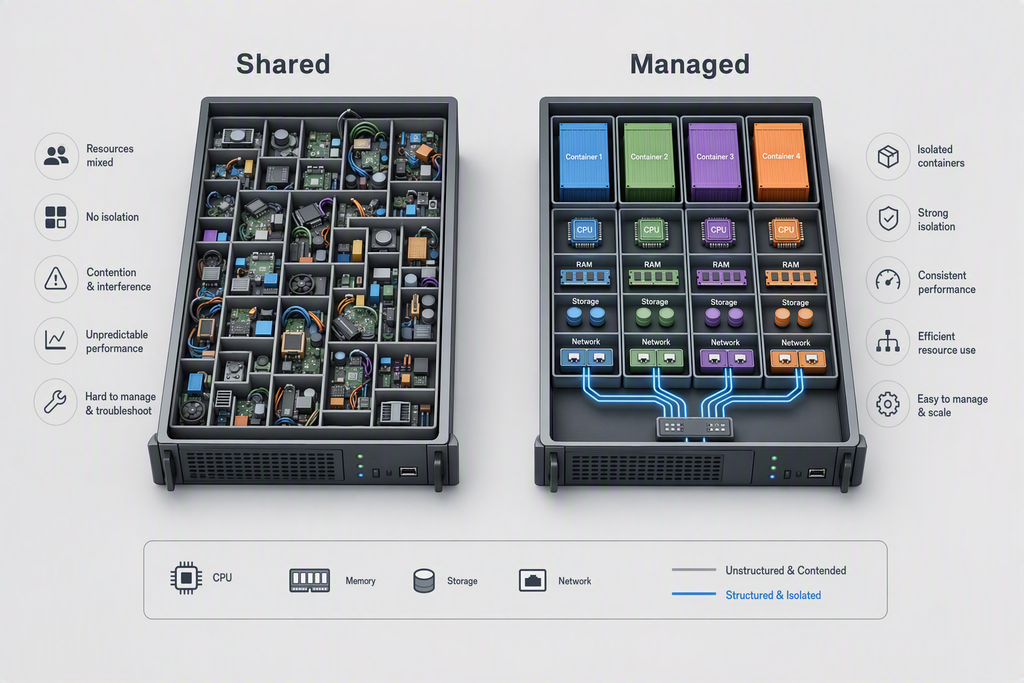
At the 10,000 monthly visitor threshold, a website is highly unlikely to experience persistent high-concurrency demands. Most visits are distributed throughout the 24-hour cycle, meaning the server rarely handles more than two or three concurrent users at any single second. Because of this distributed load, the basic resource allocation of shared environments is often technically sufficient. Shared hosting groups hundreds of accounts on a single physical server, distributing CPU and RAM dynamically.
In contrast, managed WordPress hosting reserves specific containers or optimizes server-level caching specifically for the WordPress database structure. While this optimization yields faster response times, the performance difference for hosting under 10000 visitors is often negligible if the shared server is not severely oversold. According to industry server benchmarks, basic page caching can mitigate almost all performance bottlenecks associated with shared environments at low traffic tiers.
Quick Summary
- Shared environments easily handle low-concurrency traffic when basic page caching is properly configured.
- Managed platforms offer performance optimizations that become noticeably beneficial only as traffic scales or concurrent requests spike.
The Maintenance Burden and Technical Overhead
The true differentiator between these two hosting models is not raw speed, but the division of labor. Shared hosting is fundamentally self-managed. The provider maintains the physical hardware and the control panel, but the site owner must handle core updates, plugin compatibility, security configurations, and backups. When managing hosting under 10000 visitors, these tasks can occupy a disproportionate amount of time relative to actual content creation.
Looking for Blazing-Fast NVMe Cloud Hosting?
ChemiCloud delivers LiteSpeed-powered 100% NVMe storage, free 24/7 migration, a free domain, and an industry-leading 45-day money-back guarantee.
Get Up to 70% Off ChemiCloud Plans Today →Managed WordPress hosting functions as an outsourced systems administrator. The host handles automated daily backups, staging environments, core software updates, and server-level security rules tailored to WordPress vulnerabilities. For a growing blog, this operational hands-off approach minimizes technical friction. However, this convenience comes at a premium, and you must decide if saving a few hours of maintenance per month justifies the higher recurring cost. Observed patterns suggest that many publishers initially opt for standard hosting under 10000 visitors because their development needs remain highly basic.
Key Takeaways
- Shared hosting requires manual intervention for security, plugin updates, and backup management.
- Managed hosting automates administrative tasks, significantly reducing the potential for user-inflicted site downtime.
Cost Efficiency of Hosting Under 10000 Visitors
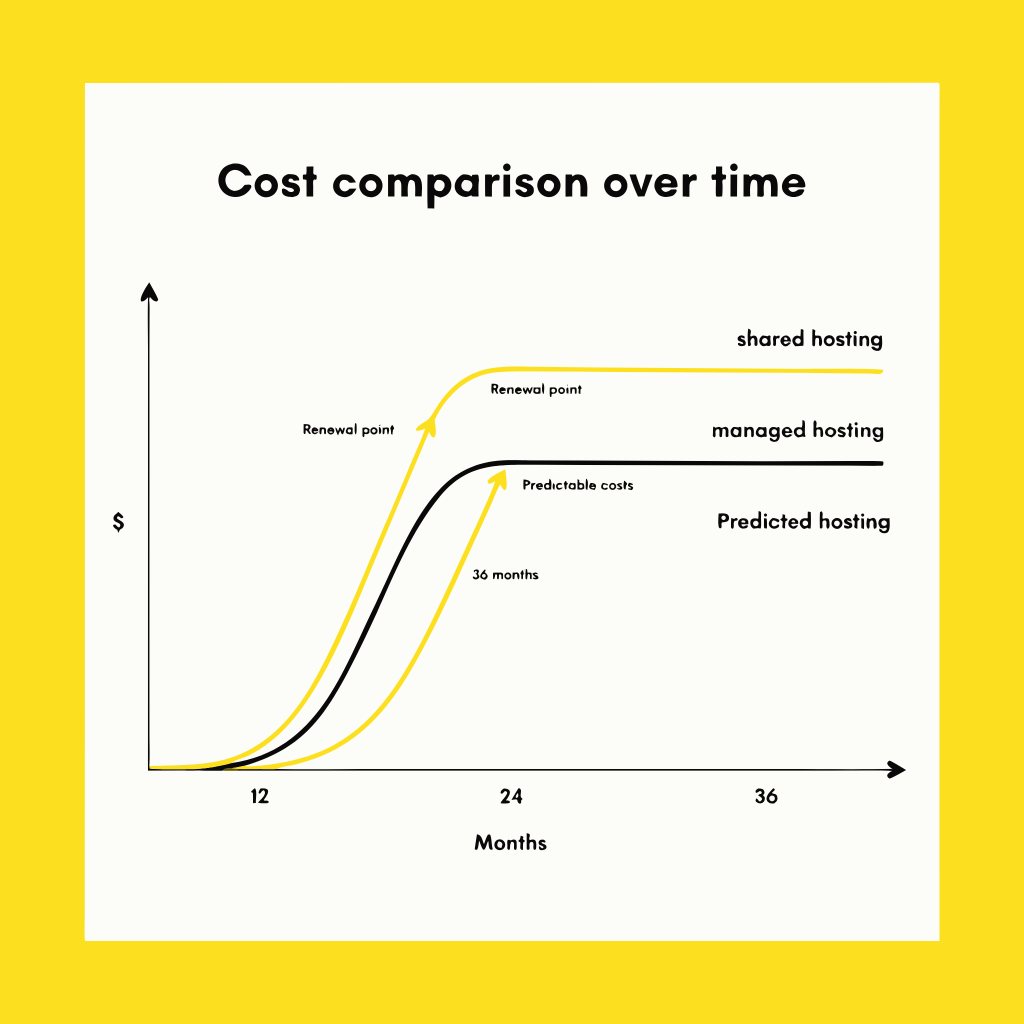
Budget allocation is a critical factor for early-stage sites that may not yet generate consistent monetization. Shared hosting packages are famously inexpensive, often starting at under five dollars per month. Managed WordPress hosting, by comparison, rarely begins below twenty or thirty dollars monthly for a single-site license.
While the low initial cost of shared hosting is highly appealing, the long-term cost trajectory requires careful scrutiny. Many providers utilize aggressive introductory rates to attract new accounts, only to raise prices significantly upon renewal. When evaluating hosting under 10000 visitors, calculating the total three-year cost of ownership—rather than focusing solely on the first-year discount—reveals the true financial impact. Analysis suggests that the cost gap between high-quality shared platforms and entry-level managed options narrows considerably when factoring in renewal rates and the potential need for premium security or backup plugins on a shared account.
Practical Performance Realities at Low Traffic
Many publishers are led to believe that shared plans will cause their site to load too slowly, driving away readers. In reality, modern web performance studies indicate that frontend optimization—such as compressing images, utilizing a lightweight theme, and leveraging a basic content delivery network (CDN)—has a far greater impact on load times than server type at this traffic scale.
If a blog is properly optimized, the difference in load times between shared and managed hosting under 10000 visitors is often measured in milliseconds, not seconds. However, if the site relies heavily on complex page builders or unoptimized database queries, a shared server will struggle. Managed platforms counteract poor optimization through aggressive server-side caching and isolated PHP workers, providing a safety net for less-experienced site builders. Making decisions about hosting under 10000 visitors requires a realistic assessment of your technical willingness to optimize your own website files.
In Short
- Frontend optimization often dictates load times more than server environment at low traffic levels.
- Managed hosts provide built-in performance guardrails that protect against unoptimized themes and excessive plugins.
Comparative Decision Matrix
To help clarify the operational differences, the following comparison highlights how each hosting style handles key functional areas for a blog operating within this traffic range.
| Feature / Requirement | Shared Hosting Approach | Managed WordPress Approach |
|---|---|---|
| Cost Structure | Very low entry fees; moderate to high renewal jumps. | Higher entry fees; predictable, premium renewal pricing. |
| Backup Systems | Often manual or requiring third-party plugins; restoration can be complex. | Automated daily backups with simple one-click restoration systems. |
| Server Resources | Shared dynamically; susceptible to neighboring site spikes. | Isolated resource allocations or highly containerized environments. |
| Security Measures | Basic firewall protection; malware removal usually costs extra. | Proactive WordPress-specific security, automatic patching, and free malware cleanup. |
Pros
- Highly economical for testing new content concepts
- Allows hosting of multiple low-traffic domains on one account
- Standard cPanel setups are familiar and widely documented
Cons
- Requires manual configuration of caching and security
- Resource sharing can cause intermittent performance dips
- Support teams are rarely specialized in WordPress troubleshooting
Choosing Your Infrastructure Path
Ultimately, the choice between shared and managed hosting under 10000 visitors depends on what resource you have more of: time or money. If your budget is highly constrained and you do not mind learning the basics of database optimization, security plugins, and backup scheduling, shared hosting provides an incredibly cost-effective starting point. It allows you to prove your concept without committing to a significant monthly overhead.
Conversely, if you prefer to focus entirely on writing, marketing, and monetization, the extra cost of a managed service functions as a productivity investment. You are paying for peace of mind and the assurance that your site will remain online, secure, and fast without your daily supervision. Long-term planning for hosting under 10000 visitors involves matching your technical self-reliance with your operational budget.
Skip If: You have zero interest in managing technical details, require guaranteed uptime during random traffic spikes, or want specialized support agents to handle site issues.
⚠️ Common Issue: Out of Memory (OOM) Errors on Shared Servers
Symptom: The site suddenly displays a “Fatal Error: Allowed Memory Size Exhausted” message when saving posts or loading resource-heavy plugins.
Likely cause: The shared host has set a low default PHP memory limit (e.g., 64MB or 128MB) to prevent individual accounts from hogging physical server resources.
Resolution: Access your cPanel, navigate to the File Manager, open the public_html directory, edit your wp-config.php file, and add the line define('WP_MEMORY_LIMIT', '256M'); right before the line that says “That’s all, stop editing!”. If the error persists, contact support to ensure the host-level PHP configuration allows this override.
Can shared hosting actually handle a sudden spike in traffic?
Yes, but only to a point. If a post goes viral and you receive thousands of visitors in a few hours, a standard shared server may run out of concurrent PHP workers, resulting in 503 Service Unavailable errors. Managed hosts handle these spikes much better due to server-level caching layers.
Is it difficult to migrate from shared to managed hosting later?
No. Most managed WordPress hosts offer free, automated migration plugins or dedicated migration services to move your site over with zero downtime. Starting on a cheap shared plan and moving later is a common and practical strategy.
Do I need a CDN if I am using managed hosting under 10000 visitors?
While managed hosts often include a built-in CDN, any site—including those on shared plans—can easily integrate a free CDN service like Cloudflare to distribute static assets globally and improve load times significantly.