
Cloud Hosting for WordPress Without Managing a Server: Setup Comparison
Selecting cloud hosting for wordpress often presents a difficult compromise between technical flexibility and management ease. Dedicated cloud infrastructure delivers exceptional processing speed, yet standard cloud servers demand advance Linux administration experience. Management platforms bridge this gap by placing an intuitive software layer over unmanaged cloud infrastructure. This comparative analysis evaluates how managed cloud platforms compare to traditional managed WordPress hosting solutions across setup complexity, maintenance workloads, and operational cost efficiency.
Quick Summary
- Managed cloud platforms automate infrastructure provisioning while giving website owners isolated cloud server resources.
- Traditional managed hosting abstracts the underlying server entirely, offering simpler daily operations with fewer configuration options.
- Performance gains on managed cloud systems depend on proper server-level caching configurations and PHP allocation adjustments.
- Cost structures differ significantly: cloud management software utilizes flexible resource-based pricing, while traditional hosts rely on fixed tier limits.
Understanding Cloud Hosting for WordPress Infrastructure
Deploying cloud hosting for wordpress through a platform layer isolates site resources from neighboring accounts. Traditional shared hosting or standard entry-level hosting packages pool multiple websites onto single virtual server instances. Managed cloud platforms instead provision an isolated virtual instance directly on enterprise cloud infrastructure providers like DigitalOcean, Linode, or Vultr.
The underlying server architecture processes dynamic PHP requests independently. Database queries execute without interference from adjacent server tenants on the same physical node. This hardware resource isolation prevents speed drops during unexpected traffic surges and stabilizes database response times under heavy concurrent loading.

System administrators historically managed these environments using manual SSH command-line terminals and complex configuration scripts. Modern cloud management platforms replace these manual steps with an accessible web dashboard. The platform automated engine handles operating system security patches, firewall configuration, and web server software compilation behind the scenes.
Looking for Blazing-Fast NVMe Cloud Hosting?
ChemiCloud delivers LiteSpeed-powered 100% NVMe storage, free 24/7 migration, a free domain, and an industry-leading 45-day money-back guarantee.
Get Up to 70% Off ChemiCloud Plans Today →As a result, site owners receive dedicated hardware performance without maintaining specialized sysadmin skill sets. This deployment model combines raw compute efficiency with user-friendly application management control.
Key Takeaways
- Isolated cloud instances eliminate performance degradation caused by high-traffic neighboring websites.
- Cloud management platform layers remove the requirement for manual Linux terminal commands during server setup.
- Resource allocations remain highly adaptable, permitting seamless vertical server upgrades as website traffic scales.
| Feature Category | Managed Cloud Platform | Traditional Managed Hosting |
|---|---|---|
| Resource Allocation | Dedicated server memory and CPU cores | Containerized shared system resources |
| Server Stack Control | Direct adjustments to Nginx, Apache, and PHP settings | Restricted hosting dashboard configuration |
| Scaling Mechanism | Instant vertical hardware resource scaling | Plan migration based on monthly visit quotas |
Cloud Hosting for WordPress Control and Performance
Configuring cloud hosting for wordpress through a dedicated management layer requires understanding basic web hosting components. While the platform automates primary server setup, users retain granular control over PHP execution limits and caching stacks. Navigating the dashboard involves straightforward click paths for domain binding, SSL issuance, and database optimization.
To deploy a new website application, administrators open the primary console, select application options, and target a specific server instance. The management system automatically provisions isolated database credentials and deploys fresh WordPress core files within seconds. Staging environments require a single click, creating a fully isolated mirror site for safe plugin testing.
According to development standards published in the Cloud Native Computing Foundation guidelines, separating staging environments from live production servers prevents critical site failures during software updates. The platform mirroring engine allows developers to test code updates and push changes live with controlled database synchronization.

Backup routines operate at both full server and individual application levels. Site administrators schedule automated daily snapshots while retaining the ability to execute on-demand manual backups before executing theme modifications. Restoring a site takes under five minutes, successfully reverting both filesystem files and MySQL database tables.
Pros
- Exceptional loading speeds through dedicated hardware resource allocation.
- Flexible hardware scaling without complex site migrations or downtime.
- Multiple separate websites can share a single provisioned cloud server instance.
Cons
- Requires general understanding of web caching and PHP stack configurations.
- No built-in email inbox hosting included on basic cloud instances.
- Technical support focuses on server infrastructure rather than custom site code.
Navigating Operational Complexity and Troubleshooting
Using cloud hosting for wordpress eliminates manual Linux maintenance, but occasional technical configuration conflicts still arise. Operational challenges typically emerge during initial domain name pointing, SSL security certificate issuance, or object caching setting adjustments. Understanding how the web server stack processes incoming network traffic allows administrators to resolve these friction points quickly.
Managed cloud environments frequently pair Nginx as a high-speed reverse proxy with Apache handling dynamic content processing. This hybrid web server architecture accelerates static asset delivery while retaining full .htaccess file compatibility for legacy plugins. However, aggressive server-level caching rules can occasionally display stale content to logged-in site administrators.
⚠️ Common Issue: SSL Certificate Domain Validation Failure
Symptom: The automated Let’s Encrypt SSL certificate provisioning tool throws an authorization error during installation.
Likely cause: DNS record changes have not fully propagated globally, or the primary A record points to a legacy web host IP address.
Resolution: Verify DNS propagation status using external lookup tools. Ensure both the root domain and www record point directly to your cloud server IP address before running the automated SSL installer again.
When investigating performance issues, reviewing the active PHP memory allocation limit remains essential. Default platform limits may restrict resource-heavy e-commerce stores or complex page building tools. Increasing execution limits via the central management console resolves script exhaustion errors without editing underlying configuration files manually.
Analyzing Cost structures and Hardware Scaling
Evaluating cloud hosting for wordpress requires looking beyond initial introductory pricing packages. Managed cloud platforms charge a predictable combined fee that includes raw server infrastructure costs alongside control panel software licensing. This pricing structure proves exceptionally cost-effective when hosting multiple low-to-medium traffic websites on a single server instance.
Traditional managed web hosts frequently bill accounts based on total monthly visitor thresholds or strict bandwidth caps. In contrast, cloud management platforms calculate billing based on hardware capacity like allocated RAM, CPU cores, and SSD storage space. High-traffic websites with optimized lightweight code often achieve substantial savings under resource-based pricing structures.
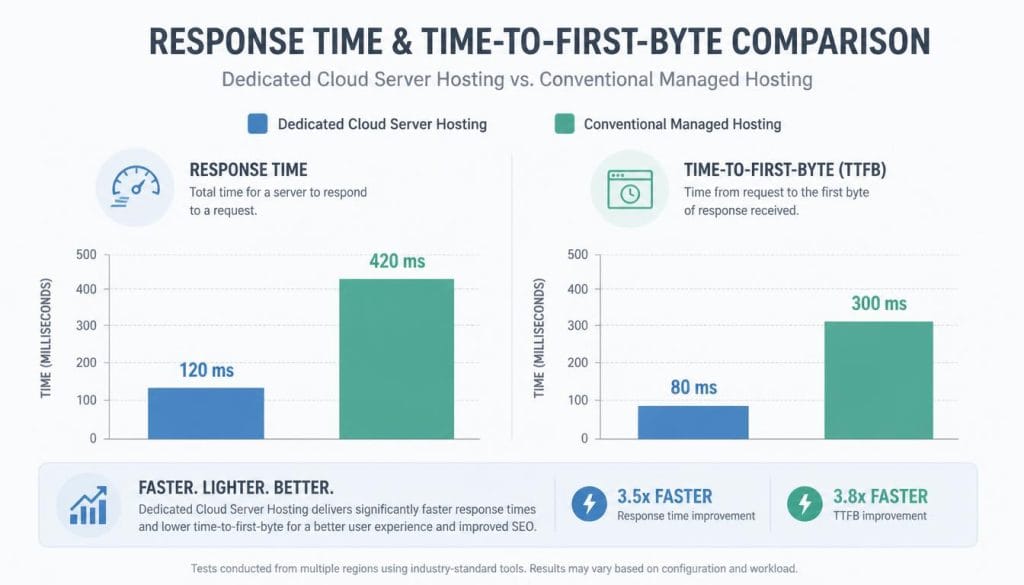
Performance research documented in the W3C Web Performance Working Group standards confirms that time-to-first-byte metrics heavily impact user engagement. Dedicated cloud infrastructure delivers consistently fast initial server responses due to unshared server memory and high-speed NVMe storage read cycles.
For agencies and site owners managing portfolios of client projects, resource allocation on cloud hosting for wordpress provides clear operational efficiencies. Instead of purchasing separate hosting packages for every client site, multiple client websites can reside efficiently on one appropriately sized cloud instance.
Making the Final Decision for Your Infrastructure
Selecting cloud hosting for wordpress ultimately depends on your team’s technical workflow and operational priorities. Managed cloud platforms suit site owners who desire dedicated server speed and granular control without performing manual Linux terminal administration. Traditional managed web hosting remains better tailored for users who prefer completely hands-off operations and phone-based technical assistance.
If your web projects require fast server performance, flexible hardware scaling, and multi-site consolidation on single servers, managed cloud infrastructure offers an optimal balance. Conversely, if you demand bundled email accounts, single-click simplicity, and full support for third-party plugin debugging, standard managed hosting may fit your needs better.
Skip If: You require built-in email box hosting, phone-based tech support, or total abstraction from web stack configurations.
In Short
- Managed cloud hosting pairs raw cloud server speed with simplified browser control panels.
- Resource-based billing models provide significant financial advantages for agency multi-site hosting.
- Basic familiarity with DNS records and server caching helps maximize overall infrastructure value.
Frequently Asked Questions
Is cloud hosting for wordpress harder to set up than standard shared hosting?
Setting up a managed cloud server requires a few additional initial steps, such as manually updating domain DNS records. However, automated platform installation tools handle server stack building, application deployment, and security certificate creation without requiring terminal commands.
Do managed cloud platforms include domain registration and email hosting?
Most managed cloud platforms focus exclusively on server performance and do not act as domain registrars or email providers. Domain names remain registered with third-party registrars, while email inboxes are typically managed through dedicated business email services.
Can I scale my server hardware resources if website traffic spikes?
Yes, cloud infrastructure allows immediate vertical scaling. You can increase RAM allocation, CPU power, and storage disk space directly through the central management dashboard to support traffic growth without site migration.