

Selecting a hosting provider for a low-traffic blog is often guided by introductory promotions. However, for a blog receiving under 10,000 monthly pageviews, the long-term budget is determined almost entirely by what happens after that initial contract expires. When starting a new blog, comparing the entry-level plans of major hosts is common, but analyzing the Bluehost vs Hostinger renewal cost is where real budget planning begins.
Many new publishers fail to account for the steep price increases that occur at the end of the first billing cycle. For a site with modest traffic, there is no technical justification for paying high renewal premiums. This analysis breaks down the actual renewal pricing, hidden add-on fees, and long-term value of both hosting platforms for low-traffic sites.
Scope Limitation: This comparison evaluates entry-level shared hosting plans specifically tailored for blogs under 10,000 monthly visitors. It does not address dedicated servers, high-traffic cloud environments, or enterprise-tier configurations.
The Low-Traffic Shared Hosting Baseline
Blogs with under 10,000 monthly visitors have very light server resource requirements. They do not need massive RAM allocations or high-performance CPU cores. Instead, they require reliable uptime, basic security, and a cost structure that does not outpace the blog’s early monetization.
Both Bluehost and Hostinger target this segment with entry-level shared hosting. However, their promotional strategies differ. While both offer enticing entry prices, the long-term operational expense is dictated by the renewal rates.
Breaking Down the Bluehost vs Hostinger Renewal Cost
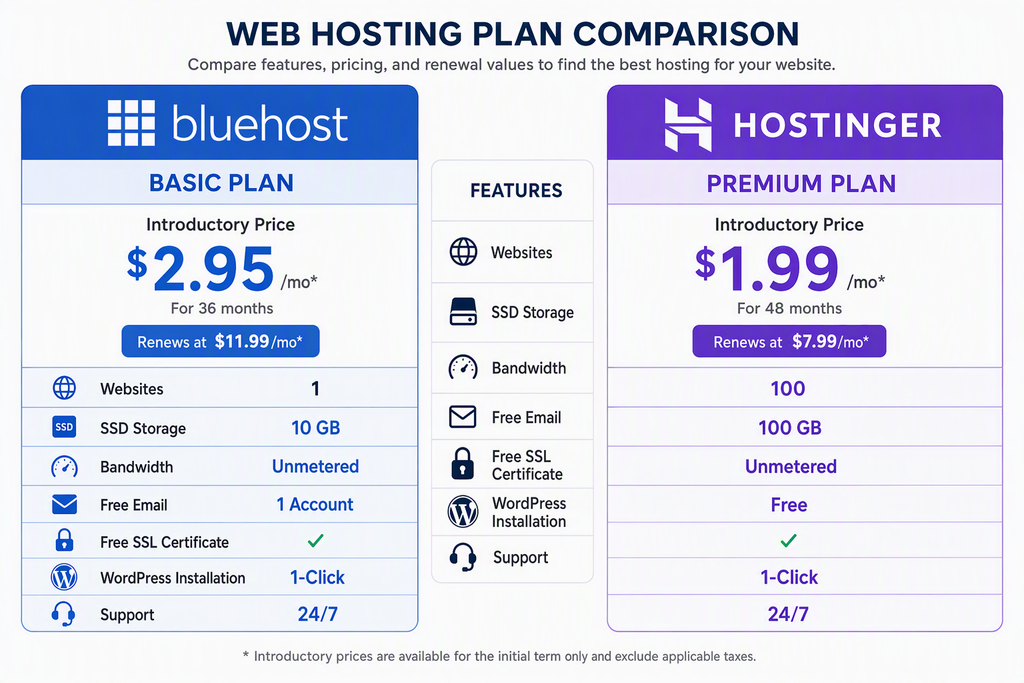
To understand the true Bluehost vs Hostinger renewal cost, we must look past the 50% to 70% introductory discounts. Most hosting promotional rates are locked in for a 12-month or 36-month term. Once that term ends, the pricing reverts to the standard rate.
Looking for Blazing-Fast NVMe Cloud Hosting?
ChemiCloud delivers LiteSpeed-powered 100% NVMe storage, free 24/7 migration, a free domain, and an industry-leading 45-day money-back guarantee.
Get Up to 70% Off ChemiCloud Plans Today →Our analysis of observed market data shows that the Bluehost vs Hostinger renewal cost diverges significantly after the initial term. Hostinger generally positions its renewal rates lower across comparable entry tiers, whereas Bluehost maintains a higher baseline standard rate.
Key Takeaways
- Hostinger offers a lower renewal rate on its entry-level shared hosting plan compared to Bluehost.
- Bluehost requires a longer initial commitment to lock in the lowest promotional rates.
- The renewal price gap widens when accounting for multi-year contract renewals.
| Hosting Plan (Entry-Level) | Introductory Price (Monthly) | Renewal Price (Monthly) |
|---|---|---|
| Bluehost Basic (12-Month Term) | $2.95 | $10.99 |
| Hostinger Premium (12-Month Term) | $2.99 | $7.99 |
| Bluehost Basic (36-Month Term) | $4.95 | $9.99 |
| Hostinger Premium (48-Month Term) | $2.49 | $6.99 |
How Add-ons Inflate the Bluehost vs Hostinger Renewal Cost
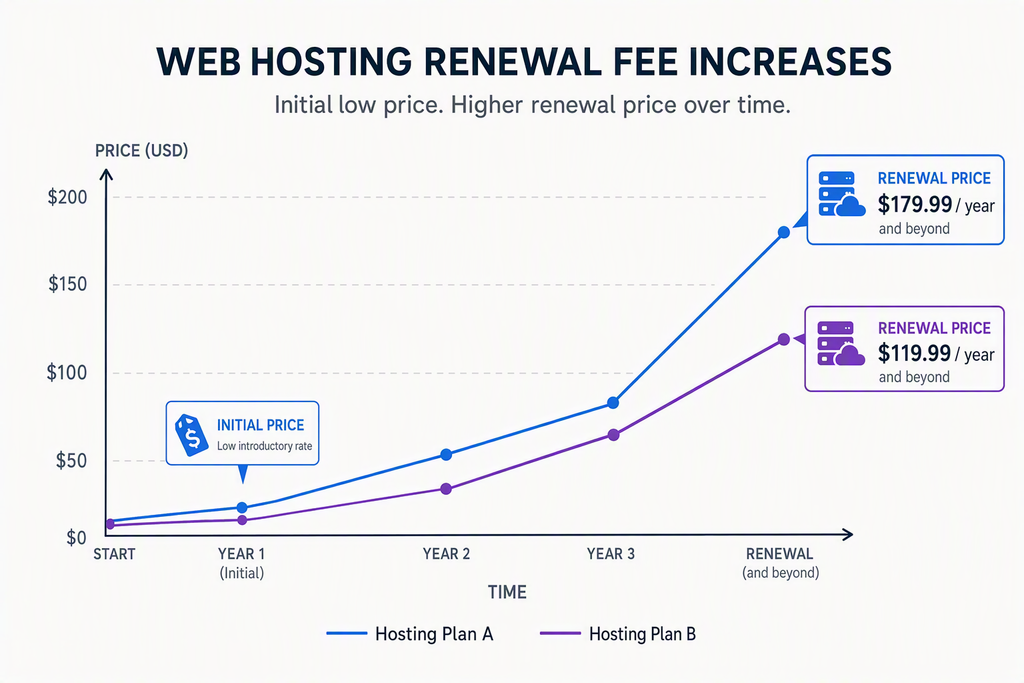
The base hosting price is only one part of the equation. Domain privacy and automated backups are two features that can silently double the Bluehost vs Hostinger renewal cost if not managed carefully.
For example, Bluehost charges separately for domain privacy protection on its lowest tier after the first year, whereas Hostinger includes it for free in most standard configurations. Additionally, automated daily backups often require a paid add-on on Bluehost’s entry-level plans, while Hostinger includes weekly backups at no extra charge. Understanding how these add-ons impact the Bluehost vs Hostinger renewal cost is key to protecting your budget.
Bluehost Shared Hosting
- Established integration with WordPress setup flows
- 24/7 phone support included on all tiers
- Free domain name for the first year
Bluehost Shared Hosting
- Higher renewal rates on entry plans
- Domain privacy and backups cost extra at renewal
Calculating the Three-Year Cost Reality
When projecting long-term expenses, calculating the Bluehost vs Hostinger renewal cost over a three-year period reveals a clear winner. For a small blog, every dollar spent on hosting is a dollar that cannot be allocated to content creation or marketing.
If we evaluate a standard 36-month timeline—combining the initial promotional year with two years of standard renewals—the cumulative difference becomes clear. According to web technology surveys compiled by W3Techs, hosting cost efficiency is a primary driver for platform migration among early-stage webmasters.
Minimizing fixed overhead allows publishers more runway to build traffic organically. This pattern is supported by consumer broadband pricing data from the FCC which highlights how recurring subscription inflation impacts small digital businesses.
Decision Framework: Which Plan Best Fits Your Budget?

Choosing between these two hosting providers comes down to balancing support preferences against raw renewal expenses. If your primary goal is minimizing ongoing software costs while maintaining a simple blog under 10,000 visitors, Hostinger offers a clear financial advantage.
Skip If: You require immediate, 24/7 phone support and prefer a guided WordPress onboarding interface regardless of the higher renewal premium.
Bottom Line
- Hostinger is highly cost-efficient over a multi-year horizon due to lower renewal rates and included features.
- Bluehost offers solid support infrastructure but demands a higher financial investment at renewal.
- Minimizing your Bluehost vs Hostinger renewal cost requires selecting the correct initial billing cycle to avoid unexpected price spikes.
Common Setup Issues During Migration or Launch
Setting up a low-traffic blog or migrating it between servers can occasionally lead to technical hurdles. Understanding these potential roadblocks can save time and prevent unexpected downtime.
⚠️ Common Issue: SSL Certificate Fails to Renew
Symptom: Visitors see a “Your connection is not private” warning when loading your blog after domain mapping.
Likely cause: The domain DNS records have not fully propagated, or the automated Let’s Encrypt SSL check failed during the initial setup propagation delay.
Resolution: Navigate to your hosting control panel (hPanel for Hostinger or the Security tab in Bluehost), locate the SSL settings, and click “Reinstall” or “Force HTTPS” after verifying that your domain nameservers are pointing correctly to your host.
Frequently Asked Questions
Does Hostinger charge extra for domain privacy at renewal?
No, Hostinger includes WHOIS domain privacy protection for free with its domain registrations, meaning you will not face an unexpected charge for this service during renewal.
Can I migrate my blog for free if renewal costs get too high?
Yes, both providers offer migration assistance, though Hostinger provides a dedicated automated migration tool in their control panel to easily import existing WordPress sites at no additional cost.
Is a blog under 10,000 visitors safe on a basic shared hosting plan?
Yes, entry-level shared plans are optimized to handle up to 10,000 to 25,000 monthly visitors easily, provided the site does not use excessive unoptimized plugins or massive uncompressed images.