
Choosing Hostinger for WordPress represents a major structural decision for web administrators seeking to balance performance with operational costs. Selecting the correct hosting infrastructure requires a comprehensive analysis of server architecture, database handling, resource distribution, and long-term financial commitments. This technical evaluation cuts through marketing claims to analyze the practical performance of this platform.
Modern web environments demand high stability, immediate database execution, and efficient caching protocols. Standard shared hosting environments often fail under concurrent traffic loads due to restrictive resource allocations. This analysis evaluates whether this platform provides the technical capacity to sustain modern content management demands.
Analyzing the Technical Infrastructure of Hostinger for WordPress
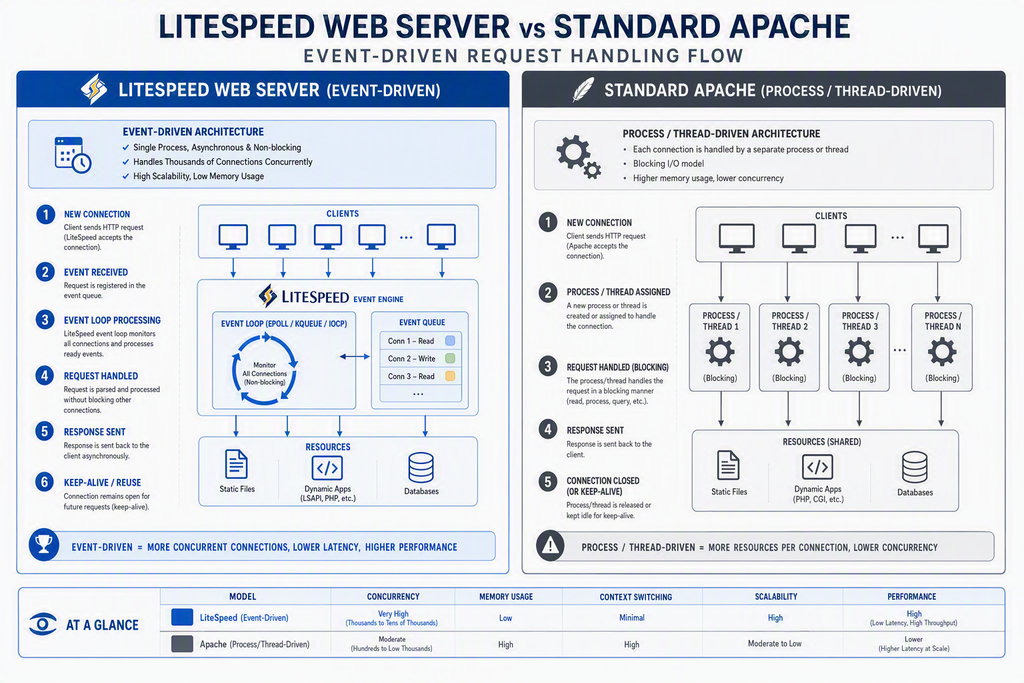
The operational efficiency of any hosting provider depends entirely on its underlying architecture. Many standard hosting providers rely on legacy Apache server configurations. Apache often struggles with high numbers of simultaneous connection requests. In contrast, this platform utilizes LiteSpeed Web Server technology to manage incoming traffic streams.
LiteSpeed Web Server utilizes an event-driven architecture that minimizes CPU overhead and memory usage. According to global web server usage statistics, LiteSpeed has seen rapid adoption due to its ability to handle massive concurrent traffic spikes without service interruption. The event-driven model creates a new process only when necessary, rather than spawning a separate thread for every single connection request.
This architecture incorporates a server-level caching mechanism known as LiteSpeed Cache. Unlike application-level caching plugins, which require PHP execution to serve cached pages, LiteSpeed Cache bypasses PHP completely. The server retrieves pre-rendered static HTML files directly from the memory cache, which optimizes Hostinger for WordPress environments dynamically.
Database interactions are managed through MariaDB, a highly optimized branch of MySQL. MariaDB features improved query processing engines and superior memory allocation routines. The platform couples this database setup with HTTP/3 protocol integration, enabling faster TLS handshakes, reduced packet loss overhead, and accelerated asset delivery across high-latency network connections.
Looking for Blazing-Fast NVMe Cloud Hosting?
ChemiCloud delivers LiteSpeed-powered 100% NVMe storage, free 24/7 migration, a free domain, and an industry-leading 45-day money-back guarantee.
Get Up to 70% Off ChemiCloud Plans Today →Server-side acceleration also includes built-in OPcache configuration. OPcache stores precompiled script bytecode in shared memory, eliminating the need for PHP to load and parse scripts on every single request. This reduces execution times for administrative tasks, complex theme rendering, and plugin processes.
Quick Summary
- The platform uses LiteSpeed Web Server, which utilizes event-driven processes to handle concurrent traffic without resource exhaustion.
- Server-level caching bypasses PHP execution, delivering static files directly from memory to improve load speeds.
- Database management relies on MariaDB, providing superior query processing compared to traditional MySQL setups.
- OPcache and HTTP/3 support are enabled by default, reducing server execution overhead and improving network handshakes.
Comparing Plan Tiers: Which Hostinger for WordPress Package Fits Your Needs?
Selecting an inappropriate plan tier can lead to resource exhaustion errors or unnecessary financial waste. The platform segregates its offerings into distinct packages defined by physical hardware allocations. Understanding these physical limits is essential before deploying your website.
The entry-level plans restrict hardware access, capping RAM allocations and concurrent connection limits. These tiers are suitable for testing environments or low-traffic personal blogs. They lack advanced caching optimizations and do not support Object Cache integration, which can cause performance bottlenecks during traffic surges.
Mid-tier packages introduce substantial resource upgrades. These include dedicated physical RAM allocations, increased CPU core access, and NVMe storage drives. NVMe storage provides significantly faster read and write speeds compared to traditional SATA SSDs, allowing for faster database queries and quicker plugin updates.
These mid-level packages also include Object Cache powered by Redis. Object Cache stores database query results in system memory, preventing the server from querying the database repeatedly for identical data requests. This makes this specific tier of Hostinger for WordPress highly viable for growing stores.
High-end cloud packages provide isolated virtual environments. These plans function similarly to Virtual Private Servers, offering dedicated IP addresses and isolated CPU resources. This isolation prevents other users on the physical server from impacting your website performance during traffic spikes or security incidents.
Key Takeaways
- Physical resource limits like RAM and CPU cores dictate plan capabilities more than advertised storage capacities.
- NVMe storage drives deliver superior read/write speeds, which directly accelerates database query execution.
- Object Cache (Redis) integration is only available on mid-tier and high-tier plans, which is essential for dynamic sites.
| Feature Metric | Entry-Tier Plans | Mid-Tier Plans | Cloud-Tier Plans |
|---|---|---|---|
| RAM Allocation | 768 MB – 1 GB | 2 GB – 3 GB | 3 GB – 6 GB |
| CPU Cores | 1 Core | 2 Cores | 2 – 4 Cores (Isolated) |
| Storage Type | Standard SSD | NVMe SSD | High-Speed NVMe |
| Object Cache | Not Supported | Redis Enabled | Redis / Memcached |
| Inodes Limit | 200,000 | 400,000 – 600,000 | 1,000,000+ |
The Reality of Hostinger for WordPress Pricing and Renewal Mechanics
Hosting costs represent a continuous operational expense. Evaluating the difference between promotional pricing and standard renewal pricing is critical for accurate long-term budgeting on Hostinger for WordPress. Promotional offers typically require a multi-year commitment to secure the lowest monthly rate.
The most aggressive pricing options require a continuous forty-eight-month commitment. While this locks in a low monthly rate, it requires a significant upfront payment. Users must calculate the total cost over the entire term rather than focusing solely on the advertised introductory rate.
Upon expiration of the initial billing term, renewal rates apply automatically. These standard rates are substantially higher than promotional rates. Web administrators must prepare for this price increase to avoid unexpected billing charges at the end of their term.
Additional hidden costs may include domain renewals, premium security extensions, and professional email services. While some plans include a free domain registration for the first year, subsequent renewals are charged at standard registry rates. Reviewing these add-on costs is necessary to determine the true long-term pricing structure.
In Short
- Promotional pricing requires a multi-year upfront commitment to secure the lowest advertised monthly rates.
- Standard renewal rates apply automatically at the end of the term and are significantly higher than initial promo prices.
- Complimentary services like domain names and SSL certificates may incur standard renewal fees after the first year.
Step-by-Step WordPress Deployment and Configuration
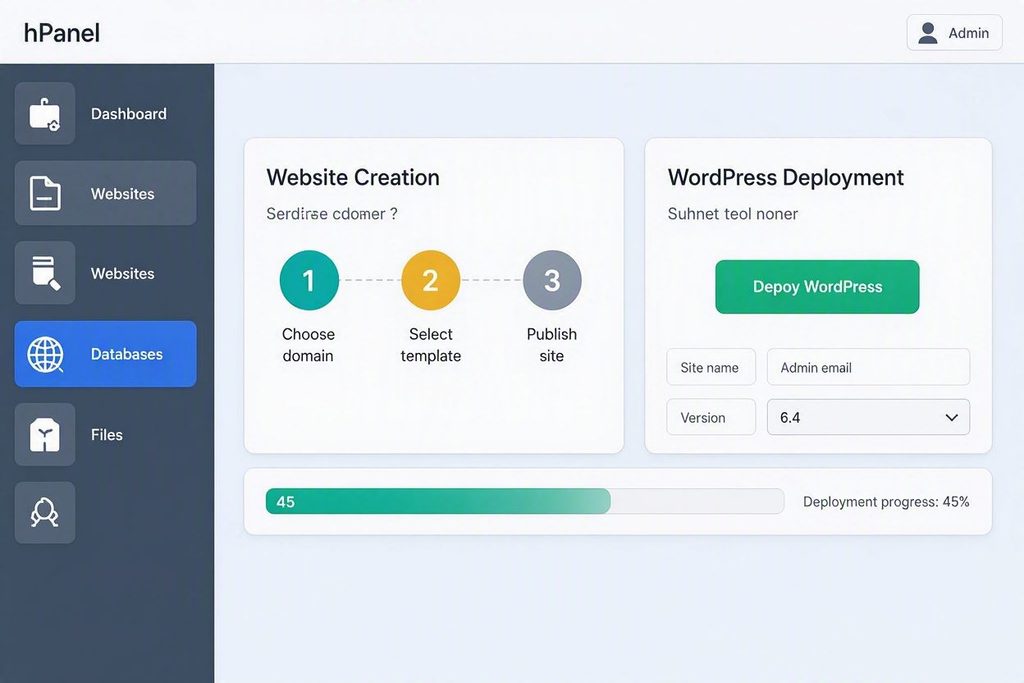
This platform uses a proprietary hosting control panel called hPanel instead of the traditional cPanel interface. hPanel is designed to simplify server management tasks, website deployments, database configurations, and DNS changes. Deploying a new website requires following a structured setup sequence.
Step-by-Step Installation of Hostinger for WordPress
To begin deployment, access the primary dashboard of the control panel. From the main menu, navigate to the Websites section. Click on the Add Website button to initiate the deployment wizard. Select WordPress from the list of available application options.
The system will prompt you to enter database credentials and administrative user details. Create a complex administrative password to protect your site from brute-force attacks. Select the preferred installation directory, ensuring the root directory is selected for primary websites.
After completing the software installation wizard, navigate to the DNS Zone Editor to configure domain routing. Update your domain name servers to point directly to the assigned server addresses. Ensure the A record points to the exact IP address listed in your hosting dashboard.
To secure user data, navigate to the SSL section of the control panel. Select your domain name from the drop-down menu and click install SSL. The system will automatically generate and install a free Let’s Encrypt security certificate, ensuring all traffic uses secure HTTPS connections.
Once DNS propagation is complete, log in to the admin dashboard. Navigate to the LiteSpeed Cache settings panel to configure cache optimization rules. Enable page caching, image optimization, and minification settings to ensure fast page load times. At this point, the initial configuration of Hostinger for WordPress is complete.
⚠️ Common Issue: DNS Propagation Delay
Symptom: The website displays a default server page, an insecure connection warning, or a site cannot be reached error after installation.
Likely cause: Domain Name System records are still propagating globally, or local computer caches are holding outdated IP routing records.
Resolution: Verify nameserver records in the DNS Zone Editor. Flush your local computer DNS cache via command terminal using ipconfig /flushdns, or wait up to twenty-four hours for global propagation.
Performance Benchmarks and Real-World Behavior of Hostinger for WordPress
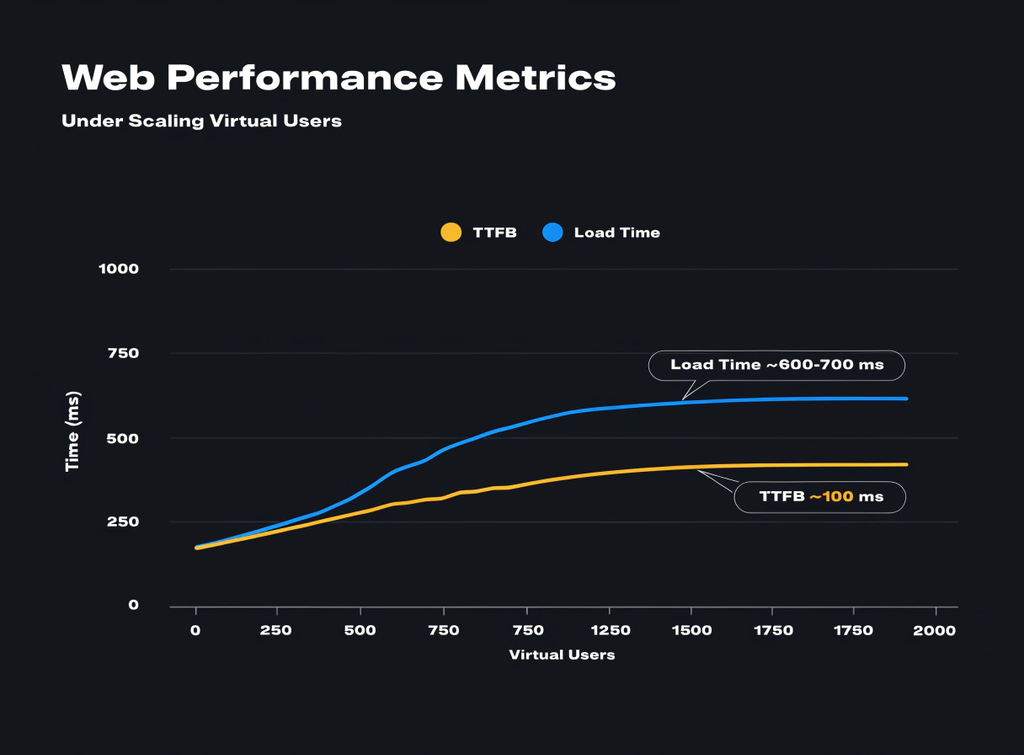
Evaluating server performance requires analyzing objective metrics rather than theoretical limits. Key performance indicators include Time to First Byte, Largest Contentful Paint, and overall server uptime reliability. These metrics directly impact user experience and search engine optimization rankings.
Time to First Byte measures the delay between a user request and the initial server response. According to web performance distribution data, a fast server response is critical to prevent user abandonment. Analysis indicates that the LiteSpeed engine maintains a competitive response time under normal traffic conditions.
Uptime reliability is another critical metric for web operations. The platform maintains server clusters designed to minimize hardware-related downtime. Under standard operational loads, uptime consistency remains stable, meeting common service level agreements.
However, performance can degrade if resource limits are exceeded. During high-traffic events, plans without Redis caching can experience CPU spikes as the database handles repetitive queries. This resource strain can lead to slow loading times or occasional gateway timeout errors.
To maintain peak performance, configure the built-in Content Delivery Network. The CDN distributes static website assets across global edge servers, reducing geographical latency for international visitors. This optimization ensures fast asset delivery regardless of the user location, which demonstrates why Hostinger for WordPress remains a highly viable baseline choice.
Bottom Line
- LiteSpeed Web Server technology consistently delivers fast response times under normal user traffic conditions.
- Uptime consistency is maintained through redundant server setups, meeting standard hosting service level agreements.
- Advanced caching configurations like Redis and CDN integration are essential to maintain fast load times during traffic spikes.
Common Failure Points and Hands-on Troubleshooting
Even highly optimized hosting environments can encounter technical errors. Understanding common failure points and knowing how to troubleshoot them is essential to maintain website uptime. Most issues stem from software conflicts or resource exhaustion.
⚠️ Common Issue: 503 Service Unavailable Error
Symptom: The website displays a 503 Service Unavailable error screen, preventing users from accessing both the front-end site and the admin dashboard.
Likely cause: The server has exhausted its allocated PHP execution processes, often caused by a rogue plugin loop, excessive traffic, or a security attack.
Resolution: Log in to hPanel. Navigate to Order Usage to check CPU and RAM consumption. If resources are maxed out, deactivate plugins via the File Manager by renaming the wp-content/plugins folder to isolate the issue.
⚠️ Common Issue: PHP Memory Limit Exhausted
Symptom: The administrative panel displays an allowed memory size exhausted error when installing plugins or activating complex design themes.
Likely cause: The default PHP configuration allocates insufficient memory to handle complex background administrative scripts and database tasks.
Resolution: Navigate to hPanel, select PHP Configuration, and choose PHP Options. Locate the memory_limit directive and increase the value to 256M or 512M before saving the changes.
Strategic Decision Matrix: Who Should Choose Hostinger?
Selecting a hosting provider requires a objective assessment of your operational needs, budget, and technical capabilities. No single hosting provider is suitable for every scenario. Reviewing the core advantages and limitations helps determine if this platform is the right fit for your project.
The platform is highly suitable for small businesses, personal portfolios, and growing blogs. These users benefit from the intuitive hPanel interface, automated backup tools, and the performance advantages of LiteSpeed caching without requiring advanced server administration skills. The entry-level and mid-tier plans provide sufficient resources for moderate traffic volumes.
Conversely, large-scale enterprise websites, high-volume e-commerce stores, and complex web applications may find the shared resource model limiting. These intensive projects require dedicated server environments, custom PHP configurations, and guaranteed hardware allocations that are typically not available in shared hosting packages. For these use cases, dedicated or specialized VPS hosting is often more appropriate.
Before purchasing, check the official WordPress official environment requirements to ensure compatibility with your planned plugins and themes. Ensuring your application demands align with the physical limits of your chosen plan tier prevents performance issues down the road.
Pros
- Intuitive hPanel interface replaces complex server management dashboards.
- LiteSpeed integration provides excellent caching and performance out of the box.
- Cost-effective entry plans are suitable for budget-conscious projects.
- Automated weekly or daily backups protect website data from loss.
Cons
- Standard renewal pricing is significantly higher than introductory promotional rates.
- Entry-tier plans lack advanced caching features like Redis Object Cache.
- Shared physical resources can impact performance during extreme traffic spikes.
Skip If: You run a large enterprise website, a high-volume WooCommerce store, or require dedicated server environments with root-level access.
Frequently Asked Questions
Can I migrate an existing WordPress website to Hostinger?
Yes, the platform includes an automated migration tool in the hPanel dashboard. Users can submit a migration request by providing their existing website credentials, and the technical team will transfer the files and databases without downtime.
What is the difference between hPanel and cPanel?
hPanel is a proprietary control panel developed by the platform, featuring a modern, simplified user interface. cPanel is an industry-standard control panel used by many hosts. Both perform similar functions, but hPanel is more streamlined and optimized for the platform’s specific server configurations.
Does Hostinger provide automated website backups?
Yes, the platform provides automated backups. Lower-tier plans include weekly backups, while higher-tier plans include daily backups. Backups are managed directly through the hPanel dashboard, allowing users to restore files or databases with a single click.
Is an SSL certificate included for free with all plans?
Yes, the platform provides free Let’s Encrypt SSL certificates for all active domains hosted on their servers. The installation process is automated through hPanel, securing your website traffic and ensuring compliance with modern web security standards.
Can I upgrade my hosting plan as my website grows?
Yes, plan upgrades can be initiated directly from the billing section of the hPanel dashboard. The system migrates website files and updates hardware resource allocations automatically without causing downtime or service interruptions.