
Choosing the right entry-level hosting is critical for launching an online storefront. When choosing a starting environment, evaluating Bluehost for WooCommerce is a common first step for new store owners. Many beginners gravitate toward the cheapest tier to minimize upfront capital. However, a live transactional storefront demands far more system resources than a standard blog.
This analysis examines whether the entry-level plan can realistically handle a functional store. This evaluation focuses strictly on the basic shared hosting tier. It does not cover managed VPS options or alternative e-commerce platforms. We analyze resource limits, database performance, and renewal pricing to help you make a low-regret choice.
Quick Summary
- The entry plan is suitable for development, staging, or low-traffic catalog sites with few plugins.
- Memory and database restrictions make it risky for stores with active checkout traffic.
- Upgrading or selecting higher tiers becomes necessary as soon as concurrent users increase.
Analyzing Bluehost for WooCommerce on the Basic Plan
The basic plan provides the bare minimum required to run a WordPress installation. WooCommerce is a resource-intensive plugin that dynamically processes transactions, cart updates, and user sessions. Unlike static pages, these dynamic actions cannot be easily cached. This means every click by a potential customer forces the server to query the database in real time.
Observed patterns suggest that using Bluehost for WooCommerce on its entry-tier plan introduces specific memory bottlenecks. The basic plan typically restricts the default PHP memory limit. This restriction frequently triggers errors when processing multiple checkout requests simultaneously. If your site processes more than three concurrent transactions, page load times can degrade rapidly.
Furthermore, storage limitations on the basic tier restrict media uploads. High-resolution product images quickly consume the allocated SSD space. If your store catalog exceeds fifty items with multiple variations, the basic plan will feel highly restrictive.

Real-World Performance Under Load
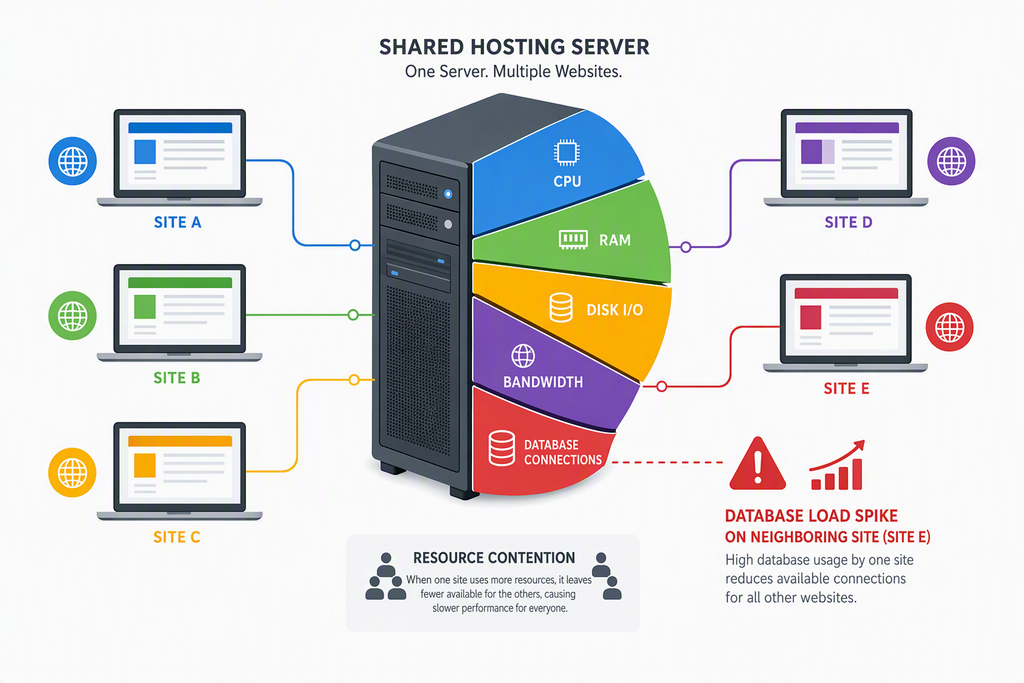
Database responsiveness determines whether a visitor completes a purchase or abandons their cart. The basic shared environment places your site on a server with hundreds of other accounts. If another website on that server experiences a traffic spike, your checkout process may slow down. This neighborhood effect is a major vulnerability for transactional websites.
Looking for Blazing-Fast NVMe Cloud Hosting?
ChemiCloud delivers LiteSpeed-powered 100% NVMe storage, free 24/7 migration, a free domain, and an industry-leading 45-day money-back guarantee.
Get Up to 70% Off ChemiCloud Plans Today →Database optimization becomes critical when running Bluehost for WooCommerce with multiple active plugins. Each active extension adds extra database tables and queries. According to web performance benchmarks from HTTP Archive, a typical checkout page requires under two seconds to maintain high conversion rates. On basic shared hosting, checkout times often exceed four seconds during peak hours.
Pros
- Very low initial setup cost for testing
- Simple WordPress and plugin installation
- Free SSL certificate included automatically
Cons
- Low PHP memory limits cause checkout lag
- No automated daily backups on the starter tier
- Shared server resources create performance instability
Database Constraints and Dynamic Queries
E-commerce platforms rely heavily on complex database interactions. According to WordPress core performance guidelines, optimizing database queries is vital for reducing server load. The basic tier limits database connections, showing how Bluehost for WooCommerce handles high-volume requests under resource constraints.
This limitation impacts your administrative tasks as well. Updating product inventory, processing bulk orders, or running sales reports can cause the server to time out. If your administrative backend freezes, your frontend storefront will likely slow down for visitors too.
Technical Setup and Common Bottlenecks
Setting up your store on shared infrastructure requires careful configuration. Navigating the hosting control panel is straightforward, but optimizing the environment takes extra effort. Users must manually adjust configuration files to prevent frequent server crashes during product import processes.
To configure your store, access your control panel and navigate to the File Manager. From there, locate the public HTML directory and open your configuration file. You must manually define memory limits to ensure the plugin has enough operating room. This step is crucial before launching any live promotions.
⚠️ Common Issue: PHP Memory Limit Exhausted
Symptom: The checkout page displays a blank white screen, or product images fail to load in the dashboard.
Likely cause: The hosting environment runs out of allocated system memory during resource-heavy database queries.
Resolution: Open your wp-config.php file via the file manager. Add the line “define(‘WP_MEMORY_LIMIT’, ‘256M’);” directly above the stop editing line, then save the changes.
The Reality of Shared Hosting Renewal Pricing
Introductory rates are highly appealing but do not reflect the long-term cost of ownership. Promotional pricing typically applies only to the initial billing cycle. Once that term expires, the cost of maintaining your site rises significantly.
For accurate budgeting, you must calculate the multi-year trajectory of your hosting expenses. Many store owners find themselves locked into a service that becomes much more expensive after twelve months. If your store is not yet profitable, this sudden price increase can strain your operating budget.
Alternative Paths for Bluehost for WooCommerce Users
If you choose to use this platform, opting for a mid-tier plan is generally safer. Higher plans offer automated daily backups, which are essential for securing order history. Losing customer data due to a database error can destroy consumer trust instantly.
Ultimately, selecting Bluehost for WooCommerce requires balancing your immediate budget against long-term site stability. If you expect steady daily traffic, skipping the entry-level plan entirely is the most logical path. Investing in dedicated resources early prevents the headache of migrating your database later.
Skip If: You plan to run active marketing campaigns, expect daily transactional traffic, or rely on more than ten active plugins.
Key Takeaways
- Basic plans are strictly meant for development, not scaling businesses.
- Transaction pages require high dynamic processing power that shared setups lack.
- Prepare for renewal rate increases after your introductory term ends.
Can I upgrade from the basic plan later if my store grows?
Yes, you can upgrade your plan directly through your hosting dashboard. However, migrating a busy database during active sales periods can sometimes cause temporary downtime or lost order records.
Does the basic plan include professional email addresses?
The entry-level tier typically limits professional email accounts or charges extra for them. For professional customer communication, relying on external business email providers is generally recommended.
Do I need a separate security plugin on this plan?
Yes, basic plans offer minimal built-in security features. Because e-commerce sites handle sensitive payment gateways, implementing third-party security firewalls is crucial to protect transaction data.