

When comparing the SiteGround vs Bluehost renewal cost for a blog with under 10,000 monthly visitors, Bluehost is lower in initial cash outlay, while SiteGround provides superior performance for its higher renewal rate. Bluehost renews its basic plans at approximately half the monthly cost of SiteGround’s entry-level plan. However, SiteGround includes built-in speed features and security protections that often cost extra on cheaper platforms. For small sites with modest resource demands, deciding between these providers requires calculating total second-year expenses rather than relying on promotional pricing.
Quick Summary
- Bluehost offers lower raw renewal rates for entry-level shared hosting tiers.
- SiteGround charges higher renewal fees but includes custom caching and automated daily backups.
- Blogs under 10,000 visitors rarely exceed resource limits on either host.
- Hidden costs like domain privacy and email hosting significantly impact total year-two pricing.
Understanding Promotional Rates Versus Long-Term Hosting Costs
Shared web hosting companies utilize steep introductory discounts to attract new website owners. Initial sign-up pricing usually applies to the first billing cycle only, which ranges from 12 to 36 months. Once this initial term expires, regular renewal pricing takes effect automatically.
Understanding the exact SiteGround vs Bluehost renewal cost mechanics requires examining the standard price jump. Bluehost typically increases its monthly base rate by roughly two to three times upon renewal. SiteGround increases its promotional pricing by up to four times once the first contract ends. These price adjustments can surprise creators who fail to budget for year-two hosting expenses.
Domain registration fees also contribute to long-term hosting expenses. Many providers include a free domain for the first year. After twelve months, domain registration renews at standard commercial rates governed by the Internet Corporation for Assigned Names and Numbers domain standards. Factoring in domain privacy protection is essential, as some web hosts charge an additional annual fee to keep owner contact details private.
| Plan Metric | SiteGround StartUp | Bluehost Basic |
|---|---|---|
| Standard Monthly Renewal | $17.99 / month | $11.99 / month |
| Storage Allowance | 10 GB SSD Storage | 10 GB NVMe Storage |
| Automated Daily Backups | Included Free | Paid Add-on ($2.99/mo) |
| Domain Privacy Protection | Included Free | Paid Add-on ($15.00/yr) |
Analyzing SiteGround vs Bluehost Renewal Cost Mechanics
Evaluating standard web hosting invoices involves looking past headline figures. A low base renewal price can quickly expand if necessary features are locked behind separate add-on subscriptions. Evaluating the full SiteGround vs Bluehost renewal cost requires adding required security and maintenance items to the base hosting invoice.
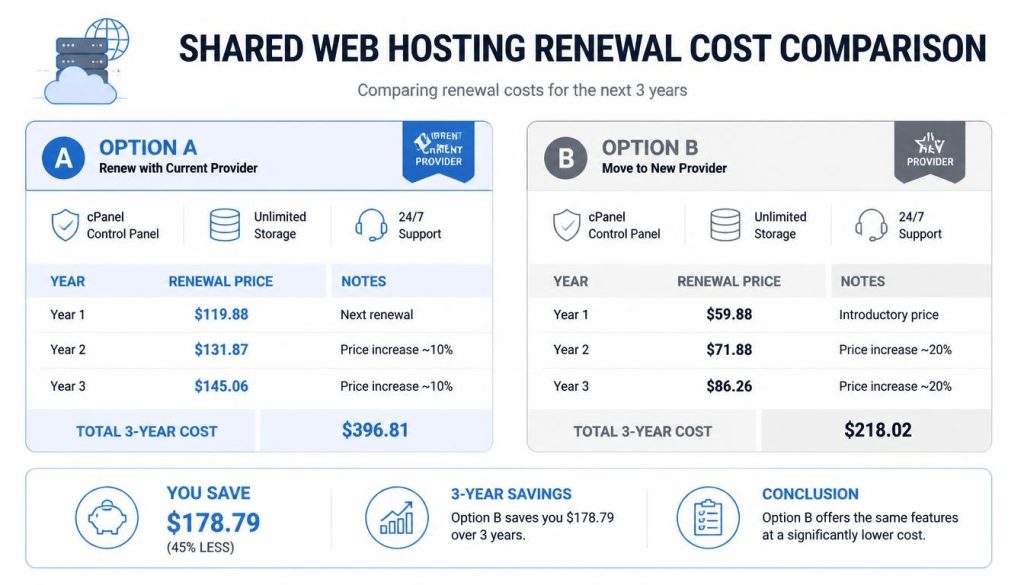
Bluehost maintains lower base renewal rates on its entry tier. However, critical website management tools like dedicated automated backups and domain privacy are often sold as separate add-ons on lower plans. If a blog owner purchases these add-ons separately, the annual cost difference between Bluehost and SiteGround narrows significantly.
Looking for Blazing-Fast NVMe Cloud Hosting?
ChemiCloud delivers LiteSpeed-powered 100% NVMe storage, free 24/7 migration, a free domain, and an industry-leading 45-day money-back guarantee.
Get Up to 70% Off ChemiCloud Plans Today →SiteGround bundle its security and maintenance infrastructure directly into its baseline package. The StartUp plan includes daily automated backups, system-level security updates, and a custom caching plugin. While the baseline renewal invoice appears high, it eliminates the need for third-party security plugins or paid backup services.
Key Takeaways
- Bluehost provides a lower baseline invoice for budget-conscious site owners.
- SiteGround includes essential security tools that reduce the need for external add-ons.
- Domain renewal fees and WHOIS privacy charges add up to $20 annually to base costs.
- Calculating total operating costs requires auditing all active account add-ons before renewal.
Resource Allocation for Blogs Under 10,000 Monthly Visitors
A website receiving under 10,000 visits per month generates minimal server load. Most modern shared hosting platforms easily handle this traffic volume without performance degradation. Understanding resource thresholds helps site owners avoid purchasing higher hosting tiers unnecessarily.
Server resource consumption is measured by database queries, memory usage, and input/output throughput. Small blogs primarily serve static content like images and text pages. Delivering static content consumes very few server resources when page caching is properly configured according to World Wide Web Consortium optimization guidelines.
SiteGround provides custom server architecture designed for rapid content delivery. Its custom SuperCacher utility stores rendered web pages directly in server memory. This architecture reduces database queries, ensuring smooth page loads even during sudden traffic surges. Bluehost uses standard web server setups that deliver reliable uptime, though dynamic requests may load slightly slower on baseline hardware.
Long-Term Value: SiteGround vs Bluehost Renewal Cost Over 36 Months
Evaluating host costs over a three-year period reveals true operational expenses. Initial sign-up discounts distort short-term perceptions. A comprehensive calculation combines year-one promotional pricing with year-two and year-three standard renewal rates.

During year one, Bluehost generally presents the lowest initial investment. This makes it an attractive choice for experimental websites or personal projects testing an idea. By year three, total spending on Bluehost remains lower than SiteGround if no add-on features are purchased.
SiteGround demands a larger overall financial investment across 36 months. However, the higher price covers specialized hosting infrastructure, including fast Google Cloud servers and automated daily data restoration points. For blogs generating revenue or building a professional brand, the performance stability may justify the ongoing renewal premium.
In Short
- Bluehost minimizes 36-month expenses for simple sites requiring basic features.
- SiteGround costs more overall but offers built-in cloud infrastructure and speed tools.
- Traffic under 10,000 pageviews per month will run smoothly on either platform’s baseline tier.
- Pricing differences stem from platform infrastructure rather than raw storage capacity.
Downsides and Real Limits of Budget Tiers
Every shared hosting package includes platform limits and trade-offs. Knowing these boundaries prevents unexpected performance issues or sudden service upgrades.
SiteGround Limits
- Strict 10 GB storage cap on the entry plan.
- High second-year renewal cost jump.
- No free domain name in initial packages.
Bluehost Limits
- Automated backups require extra add-on costs.
- Slower server response times under un-cached loads.
- Aggressive dashboard upsells for third-party tools.
Bluehost limits server resource allocations on its baseline plans. If a plugin runs complex background tasks, server response times may slow down. Furthermore, essential maintenance features like staging environments and automated backups require higher plan tiers or extra fees.
SiteGround imposes a hard 10 GB storage limit on its StartUp package. Media-heavy blogs with large image files or downloadable assets may reach this limit quickly. Upgrading to higher storage tiers requires moving to the GrowBig plan, which further increases monthly renewal pricing.
Skip this if you require unlimited storage on a tight budget without paying for premium cloud infrastructure.
Technical Setup Logistics and Performance Optimization
Setting up a low-traffic blog efficiently requires proper configuration from day one. Navigating hosting dashboards correctly prevents resource bloat and avoids unnecessary service upgrades.
To configure hosting settings on either platform, navigate to the main account control panel. Click on the My Sites menu, select Manage Site, and open the Performance tab. Enable server-level caching immediately to minimize database requests and reduce server CPU usage.
⚠️ Common Issue: High Database CPU Overhead on Small Shared Hosting Plans
Symptom: Web host sends warnings regarding resource overuse or temporary site suspension on low-traffic blogs.
Likely cause: Uncached administrative tasks, automated spam comments, or unoptimized WordPress plugins triggering continuous database calls.
Resolution: Install a lightweight caching plugin, limit background plugin queries, restrict admin access via page rules, and disable native WordPress pingbacks in the dashboard settings.
Skip If: Your budget requires keeping fixed annual hosting costs strictly under $150 while hosting media-heavy content.
Frequently Asked Questions
Can I switch hosting providers before my renewal price takes effect?
Yes. Website owners can migrate their WordPress site to a new host at any time before the initial hosting term expires. Most providers offer free automated migration tools or manual transfer options to make moving seamless.
Is 10 GB of storage enough for a blog with 10,000 monthly visitors?
For most text-focused blogs with standard web images, 10 GB provides ample space for hundreds of published posts. Compression plugins help keep total disk usage well below account limits.
Do both hosts include free SSL certificates upon renewal?
Yes. Both SiteGround and Bluehost include free standard SSL certificates that renew automatically without additional charges throughout the life of the account.
Bottom Line
- Bluehost represents the most economical option for low-traffic sites seeking minimal annual renewal expenses.
- SiteGround delivers faster server speeds and built-in maintenance tools at a higher ongoing renewal fee.
- Auditing total second-year costs ensures hosting choices align with your blog’s financial plans.